
MCC Village Night Malware Writeup
This writeup is for those who didnt get the opportunity to try the malware village.
There are multiple ways to solve this challenges, personally i would use virustotal for convenience but OS1RIS said “you guys depends on tools alot” hehe.
Note: ALWAYS run malware analysis inside controlled environment. In this case, you may use virtualbox or vmware.
Download Here
zip password: infected
0 - NoBu.obb
Description
what is the md5 of this NoBu.obb file?
Simple task, it asked for md5 so all we have to do is get the md5 hash.
I’ll show 3 ways of obtaining md5:
1. Using Windows
Simply run this command inside your powershell:
Get-FileHash -Algorithm MD5 NoBu.obb
2. Using Linux
If you are running kali linux (or any linux), run this:
md5sum NoBu.obb
3. Using Virustotal
insert file into virustotal > details > read md5
1 - Filetype
Description
extract the drop file. what is the file type of the file that have already extracted?
okay so basically, we have to read the malicious file and figure what file it actually is (it is not .obb file since it is obfuscated).
If you are using windows, simply right click and choose “edit in notepad” to read it using notepad.
After analysing, we can see this part:
# Write zip to file
$UtLwokbeYBmzFoFJ = "temp" + (Get-Random -Minimum 1000 -Maximum 9999).ToString() + ".zip"
$QIkxDAvg = "$env:AppData\$UtLwokbeYBmzFoFJ"
[System.IO.File]::WriteAllBytes($QIkxDAvg, $cdTlOkTcE)
This part shows that this file simple converted into zip
2 - Extraction
Description
extract the drop file and whats the hash? (in md5)
This part is kinda tricky because we need to extract the file inside the NoBu.obb and we cant simply rename it into .zip and extract it because it is now obfuscated. So, we need to decrypt it and get the zip!
From NoBu.obb:
function iBhrFCSRB {
# Embedded data decryption
$OpEYknUQeKtuOvYO = "5xTK9HCPrbLHtHKnhoUTy1aKGQ/x8DX53c9K64dEI1E="
$GqTtNpXWIc = "Yd8Pupt4L/vjrfixEsO0RQ=="
$ZYbvKLutjvBj = "S0EN+
below this part, there should be a very long obfuscated text. That long text is the “file” we need to extract. Now lets find out how to decrypt it first!
From NoBu.obb:
# Convert from base64
$fFvOuAfHIeqN = [System.Convert]::FromBase64String($OpEYknUQeKtuOvYO)
$LCDsdZltfsZVs = [System.Convert]::FromBase64String($GqTtNpXWIc)
$HKBnkHHcBzOJWLk = [System.Convert]::FromBase64String($ZYbvKLutjvBj)

# Create AES decryptor
$RCklKqNWj = [System.Security.Cryptography.Aes]::Create()
$RCklKqNWj.Key = $fFvOuAfHIeqN
$RCklKqNWj.IV = $LCDsdZltfsZVs
$RCklKqNWj.Mode = [System.Security.Cryptography.CipherMode]::CBC
$RCklKqNWj.Padding = [System.Security.Cryptography.PaddingMode]::PKCS7
After analysing some more, we can read the comments made that this long obfuscated text is encrypted by base64 and AES decryptor. Now we need to find what is the IV and key for the AES encryption. If you dont know what is AES, click here.
We can find the key and IV just by referring these part:
$RCklKqNWj.Key = $fFvOuAfHIeqN
$RCklKqNWj.IV = $LCDsdZltfsZVs
then:
$fFvOuAfHIeqN = [System.Convert]::FromBase64String($OpEYknUQeKtuOvYO)
$LCDsdZltfsZVs = [System.Convert]::FromBase64String($GqTtNpXWIc)
and:
$OpEYknUQeKtuOvYO = "5xTK9HCPrbLHtHKnhoUTy1aKGQ/x8DX53c9K64dEI1E="
$GqTtNpXWIc = "Yd8Pupt4L/vjrfixEsO0RQ=="
After referring using ctrl+F (inside notepad), we got the key and iv!
Now simply just cyberchef to decrypt. Just put together everything we have found!
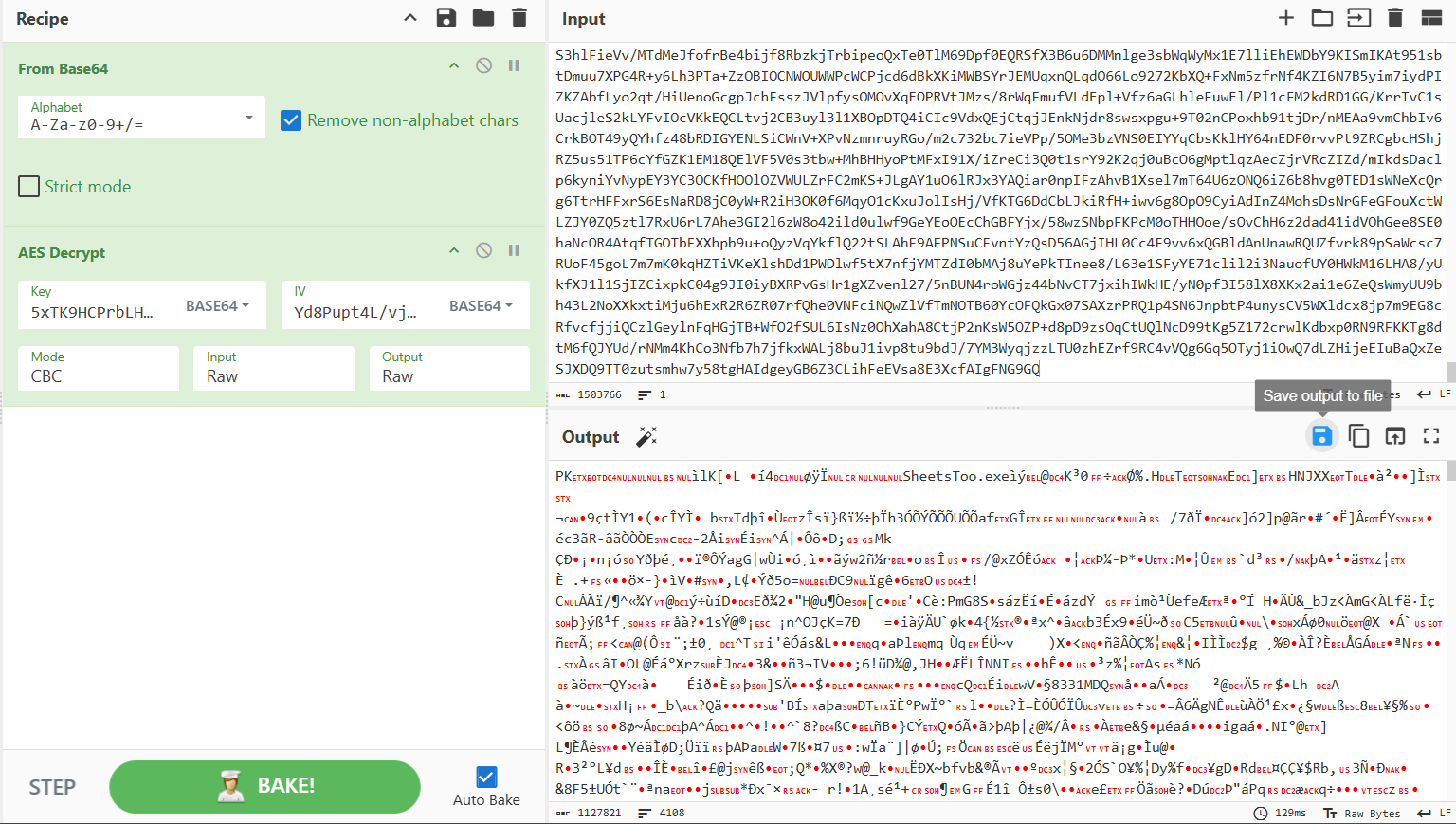
Choose “Save output to file” then download the zip! Extract the zip content and use the same method as the 0-NoBu.obb.
3 - VT
Description
total of vendor score on virustotal?
a very simple one, just throw your file (the extracted file) inside virustotal and read the vendor score.
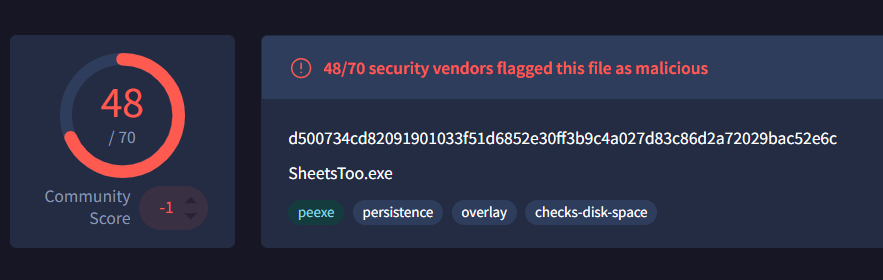
and.. there it is!
4 - Original Name
Description
what’s the original name of this file?
The original name of the file is the one that you extracted earlier, SheetsToo.exe and not NoBu.obb.
5 - Architecture
Description
whats the architecture of this file?
There are multiple ways to check the file architecture, I will show 2 ways here.
1. Using Linux
Use file command
file SheetsToo.exe
and you will get the output PE32 executable for MS Windows 6.00 (GUI), Intel i386, 5 sections. The architecture is PE32!
2. Using VirusTotal
If you are using windows, just use virustotal, go to the details tab and find this line:

we can see that the architecture is PE32!
6 - Strings
Description
whats the command line that can be seen in plaintext?
Hint
start with cmd
okay so we know that inside the SheetsToo.exe, there is a command that is coded in plaintext, so lets inspect the file and get the command line!
Again, I will show you 2 ways of answering this:
1. Using Notepad (for windows):
just right click the .exe and choose edit using notepad to inspect the file content.
then, use ctrl+F to find the “cmd”
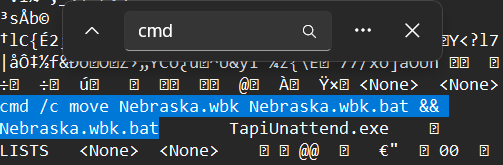
and.. there it is!
2. Using Linux:
To me this is far easier. Just run this command and get the answer:
strings SheetsToo.exe | grep "cmd"
and the answer will come right at your screen!
7 - Nebraska.wbk.bat
Description
the file is obfuscate. can you deobfuscate it and find the string that locate the program task of what they trying to locate
flag format: findstr “<string>”Hint
an antivirus that they trying to locate
The method ctrl + F on “findstr” will not work because this file is obfuscated. So we need to analyze it using tools (virustotal or AnyRun)
via virustotal, simply navigate to behaviour and scroll down to process terminated, we can find the command findstr there and thats the answer!
8 - IOC
Description
url that has been used to communicate with the virus
To find the url, we can use VirusTotal again by navigating to behaviour and scroll down to DNS Resolution. We can find the urls that has been used by the virus to communicate.
The final answer is fmyhjjxuegkckcrhhxedwmwbkdx.fmyhjjxuegkckcrhhxedwmwbkdx. It doesnt look like URL but it is indeed a URL!
Thats it for the MCC Malware Village writeup, overall the challenge is very fun and knowledgeable. Big thankyou to OS1RIS the GOAT for the heavy guidance!